



Audible is one of the most popular audiobook platforms in the world, offering thousands of audiobooks, podcasts, and Audible Originals. However, many users eventually look for ways to cancel Audible subscription due to changing needs, budget reasons, or simply because they are no longer using the service.
If you’re searching for a clear, honest, and complete guide on how to cancel Audible subscription, you’re in the right place. This article explains everything you need to know, including cancellation methods, important things to check before canceling, what happens to your audiobooks, common mistakes to avoid, and alternatives to consider.
What Is Audible and How the Subscription Works
Cancel Audible Subscription Before you cancel Audible subscription, it’s helpful to understand how the service works.
Audible is owned by Amazon and operates on a membership model. Subscribers typically receive:
- Monthly credits for audiobooks
- Access to Audible Plus catalog
- Member-only discounts
- Exclusive content
There are different plans available, such as monthly or annual subscriptions. Once you cancel, the benefits stop after the current billing cycle ends.
Why People Want to Cancel Audible Subscription
There are many reasons users decide to cancel Audible subscription, including:
- Not enough time to listen to audiobooks
- Subscription cost concerns
- Accumulated unused credits
- Switching to another audiobook service
- Temporary break from audiobooks
- Preference for physical books or eBooks
Canceling does not mean Audible is a bad service—it simply means it may no longer fit your current lifestyle.
Important Things to Know Before You Cancel Audible Subscription
Before proceeding, keep these important points in mind:
Use Your Audible Credits
Unused credits usually expire after cancellation. It’s best to spend them before you cancel Audible subscription.
Keep Your Purchased Audiobooks
Any audiobooks you purchased using credits or money remain in your library even after cancellation.
Membership Benefits Will End
Access to Audible Plus catalog ends once your subscription is canceled.
You Can Rejoin Anytime
Audible allows users to restart their membership at any time.
How to Cancel Audible Subscription on Desktop (Web Browser)
One of the most common ways to cancel Audible subscription is through a web browser.
Step-by-Step Guide
- Visit the Audible website
- Sign in to your account
- Go to “Account Details”
- Find the “Cancel Membership” option
- Follow the on-screen instructions
- Confirm cancellation
After completion, you’ll receive a confirmation email.
How to Cancel Audible Subscription on Mobile Browser
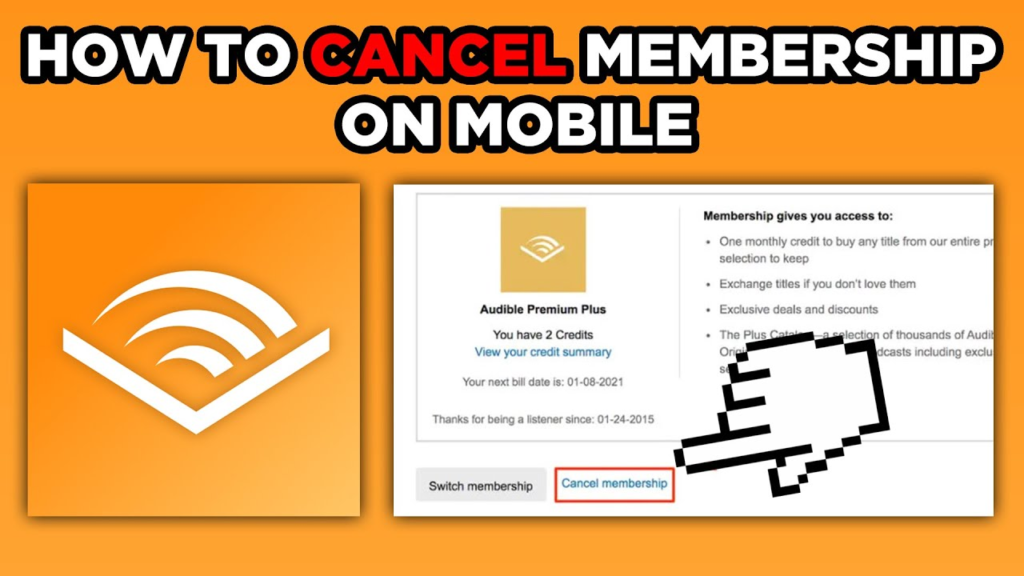
You cannot cancel Audible subscription directly through the Audible app, but you can use a mobile browser.
Steps
- Open a mobile browser (Chrome or Safari)
- Go to Audible’s website
- Log in to your account
- Navigate to account settings
- Choose cancel membership
- Confirm your decision
This method works on both Android and iOS browsers.
How to Cancel Audible Subscription Through Amazon
Since Audible is linked to Amazon, some users prefer to cancel Audible subscription through Amazon’s website.
How It Works
- Log in to your Amazon account
- Go to “Accounts & Lists”
- Select “Memberships & Subscriptions”
- Find Audible
- Click cancel subscription
- Confirm cancellation
This option is useful if you manage multiple subscriptions through Amazon.
How to Cancel Audible Subscription on iPhone (iOS Users)
If you subscribed to Audible through Apple, the process is slightly different.
Steps for iOS Users
- Open iPhone Settings
- Tap your Apple ID
- Select “Subscriptions”
- Find Audible
- Tap “Cancel Subscription”
- Confirm
In this case, Apple manages billing, not Audible directly.
How to Cancel Audible Subscription on Android
Android users who subscribed through Google Play must cancel via Google.
Steps
- Open Google Play Store
- Tap your profile icon
- Select “Payments & Subscriptions”
- Choose “Subscriptions”
- Find Audible
- Cancel subscription
Always check where you originally subscribed to avoid confusion.
Common Problems When Trying to Cancel Audible Subscription
Some users face difficulties when attempting to cancel Audible subscription.
Can’t Find Cancel Button
This usually happens if you’re logged in through the app instead of a browser.
Subscription Managed by Third Party
If Apple or Google manages your subscription, you must cancel through them.
Retention Offers
Audible may offer discounts or free months. You can accept or decline them.
What Happens After You Cancel Audible Subscription
Once you cancel Audible subscription, here’s what happens:
- Membership stays active until billing date
- You keep purchased audiobooks
- Audible Plus access ends
- Credits may expire
- You stop getting charged
Audible will also send a confirmation email for your records.
Can You Pause Instead of Cancel Audible Subscription?
Yes, Audible offers a pause option in some regions.
Benefits of Pausing
- Temporary break without losing account
- No charges during pause period
- Retain credits
If you’re unsure, pausing may be a better option than canceling completely.
Cancel Audible Subscription and Refund Policy
Audible generally does not offer refunds for unused membership time. However:
- You may be eligible for a refund in special cases
- Audiobook returns may be allowed within policy limits
- Customer support can help in unique situations
Always review Audible’s refund policies before canceling.
How to Avoid Getting Charged Again After Canceling
To ensure your cancellation is successful:
- Check confirmation email
- Review billing history
- Monitor bank or card statements
- Ensure auto-renew is turned off
These steps help avoid unwanted charges.
Alternatives After You Cancel Audible Subscription
If you cancel Audible subscription but still want audiobooks, consider alternatives:
- Library audiobook apps
- Free audiobook platforms
- One-time audiobook purchases
- Podcast platforms
This allows you to enjoy audio content without monthly fees.
Cancel Audible Subscription for Students or Gift Memberships
Gift memberships usually expire automatically and do not require cancellation. Student plans follow similar cancellation steps as standard subscriptions.
Always verify the subscription type before canceling.
Frequently Asked Questions About Cancel Audible Subscription
Can I cancel Audible subscription anytime?
Yes, you can cancel at any time without penalties.
Will I lose my audiobooks after cancellation?
No, purchased audiobooks remain in your library.
Can I rejoin Audible after canceling?
Yes, you can restart your subscription anytime.
Do unused credits roll over?
Unused credits typically expire after cancellation.
Cancel Audible_Subscription: Myths and Facts
Myth: You Lose All Content
Fact: Purchased audiobooks stay forever.
Myth: Cancellation Is Difficult
Fact: The process is simple when done correctly.
Myth: You Can’t Come Back
Fact: You can rejoin at any time.
Tips Before You Cancel Audible_Subscription
- Spend all remaining credits
- Download audiobooks for offline listening
- Check for pause options
- Save confirmation emails
These steps ensure a smooth cancellation experience.
Final Thoughts on Cancel Audible_Subscription
Deciding to cancel Audible_subscription is a personal choice and often depends on time, budget, and listening habits. Audible offers flexibility, and canceling does not mean losing your audiobooks or closing your account permanently.
By following the correct steps and understanding what happens after cancellation, you can manage your subscription confidently and avoid unexpected charges.
Whether you choose to cancel, pause, or return later, the most important thing is making the choice that fits your lifestyle.
