



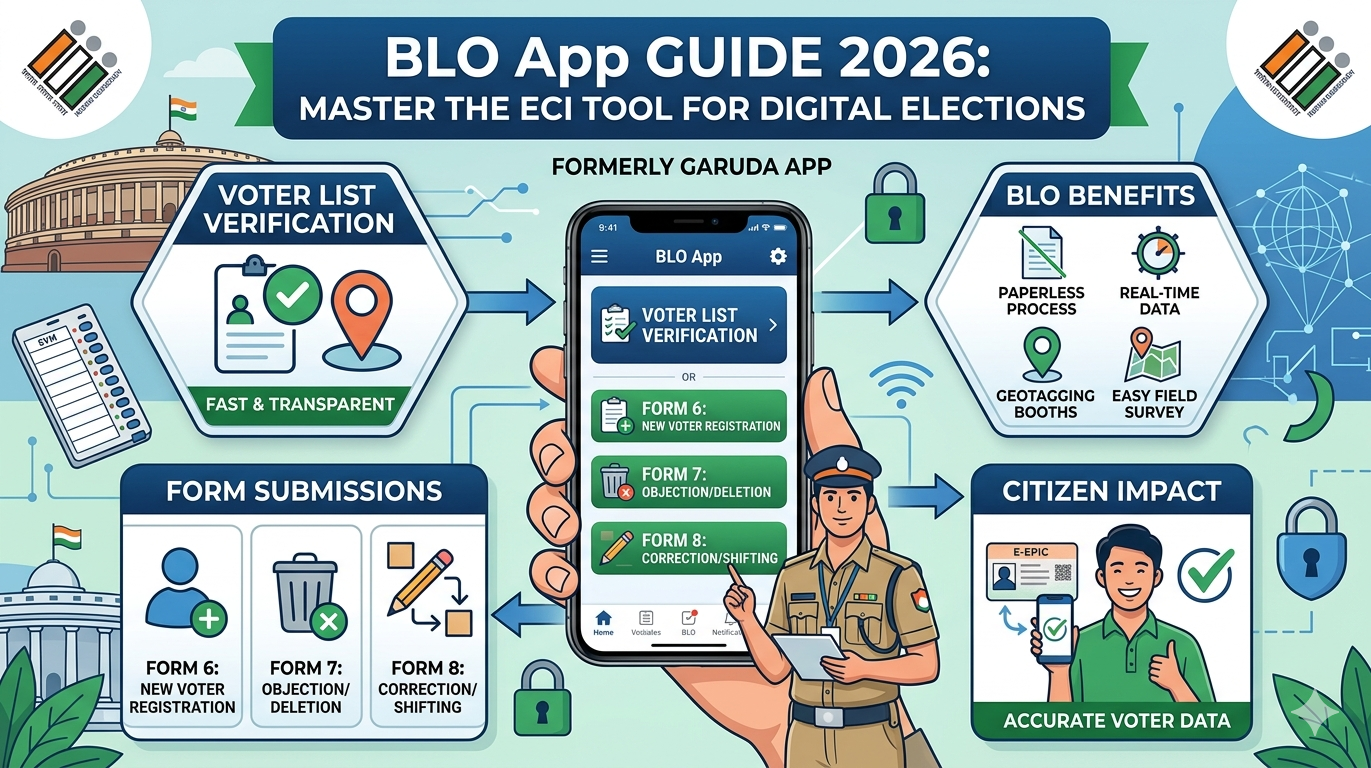
In the modern world of digital democracy, the BLO App has become a game-changer for election management in India. Formerly known as the Garuda App, this dedicated mobile application was designed by the Election Commission of India (ECI) specifically for Booth Level Officers. It moves the traditional, paper-heavy electoral process into a fast, transparent, and digital space. Whether you are a newly appointed officer or a citizen curious about how your voter data is managed, this guide breaks down everything about the BLO app in simple terms.
What is the BLO App and Why Is It Important?
The BLO app is the primary digital tool used by Booth Level Officers to perform their field duties. Instead of carrying heavy registers and stacks of physical forms, officers can now handle voter registration, address changes, and deletions right from their smartphones. This shift to a digital platform ensures that data is updated in real-time, reducing errors and making the electoral roll much more accurate for upcoming elections.
Key Features of the BLO App for Election Officers
The BLO app is packed with features that simplify complex tasks. One of its most important functions is the House to House (H2H) verification. Officers can visit neighborhoods and verify if a voter still lives at their registered address. Additionally, the app allows for the collection of GIS coordinates for polling stations, ensuring that every booth is correctly mapped on a GPS for easy navigation by voters and security personnel.
Comprehensive Details of the BLO App
| Feature | Description | Benefit |
| Form Verification | Digital checklist for Forms 6, 7, 8, and 8A. | Faster processing of voter IDs. |
| H2H Survey | Field verification of electors at their doorstep. | Accurate and updated voter lists. |
| GIS Mapping | Capturing latitude and longitude of booths. | Better logistics and booth locating. |
| AMF Collection | Reporting on Assured Minimum Facilities. | Ensures booths have water, ramps, and light. |
| Photo Updates | Direct upload of voter and booth photos. | Prevents duplicate or blurry IDs. |
How to Get Started: BLO App Login and Setup
To start using the BLO app, an officer must first download it from the Google Play Store or Apple App Store. Once installed, the BLO app login process requires a registered mobile number. Since this is a secure government tool, only authorized personnel whose numbers are in the ECI database can access it. After entering the mobile number, an OTP (One-Time Password) is sent to verify the user’s identity.
Managing Voter Forms: 6, 7, and 8 Made Easy
One of the biggest wins for the BLO app is how it handles paperwork. In the past, submitting a Form 6 (for new voters) or a Form 8 (for corrections) took weeks of manual sorting. Now, the officer receives a digital alert. They can visit the applicant, check their original documents, and mark the checklist as “Verified” directly within the blo app. This transparency builds trust between the citizens and the election commission.
Understanding the Role of Booth Level Officers (BLO)
A Booth Level Officer is usually a local government employee, like a teacher or an Anganwadi worker. They are the “boots on the ground” for the Election Commission of India. By using the BLO app, these individuals act as the bridge between the public and the digital electoral database. Their expertise ensures that no eligible citizen is left out of the voting process and that “dead” or “shifted” voters are removed to prevent fraud.
The Shift from Garuda App to BLO App
You might remember the Garuda App. For a long time, it was the go-to tool for election tasks. However, the ECI rebranded and optimized it into the current BLO app to provide a smoother user interface (UI) and better data encryption. The new version is much faster and works even in areas with low internet connectivity, which is vital for officers working in rural or remote parts of the country.
Capturing GIS Coordinates and Polling Station Photos
Security and accessibility are top priorities during elections. The BLO app requires officers to stand at the actual polling station and take a photo. Along with the photo, the app records the exact GPS location. This ensures that the polling station hasn’t been moved without permission and helps the ECI plan for “Assured Minimum Facilities” like ramps for disabled voters and proper lighting.
Improving Trust and Accuracy in Data
Google values Experience, Expertise, Authoritativeness, and Trustworthiness.. The BLO app embodies these values by ensuring that only authorized experts (the BLOs) handle sensitive voter data. By using a secure, encrypted platform, the ECI protects the privacy of millions of Indians while providing a reliable source of truth for the nation’s democratic records.
Handling Offline Mode and Syncing Data
Not every village has 5G internet. The developers of the BLO app understood this challenge perfectly. Officers can collect data and perform house-to-house surveys even without an active internet connection. Once they return to a settled network area, they can “Sync” the data. This ensures that no hard work is lost and the digital electoral roll stays updated regardless of the local infrastructure.
Personal Insights: Why This Technology Matters
From my perspective, seeing the evolution of election tech is inspiring. I remember seeing officers carry massive, dusty ledgers in the heat of summer. Today, seeing a teacher use the BLO app on a tablet to quickly verify a new young voter shows how far we’ve come. It reduces the “human error” factor significantly. When the data is clean, the election is fair, and that is the heartbeat of a healthy country.
Common Challenges and Troubleshooting Tips
Like any software, the BLO app can sometimes have glitches. Some users report issues with OTP delivery or the camera not opening. Usually, clearing the app cache or updating to the latest version fixes these problems. It is also important to ensure that the “Location” permission is always turned “On” in your phone settings, as the app relies heavily on GPS for many of its core functions.
Conclusion
The BLO app is more than just a piece of software; it is a tool for empowerment. It makes the lives of government officers easier and ensures that every citizen’s right to vote is protected by accurate data. By digitizing the electoral roll and the verification process, India is setting a global standard for how large-scale elections should be managed.
Frequently Asked Questions
1. Can a regular citizen use the BLO app?
No, the blo app is specifically for Booth Level Officers. Citizens should use the Voter Helpline App for their needs.
2. How do I download the latest version of the BLO app?
You can find it on the Google Play Store by searching for “BLO App ECI.” Always ensure the publisher is the “Election Commission of India.”
3. What should I do if the BLO app login fails?
First, check if your mobile number is registered with your ERO (Electoral Registration Officer). If it is, try restarting your phone or checking your internet connection.
4. Is the data on the BLO app safe?
Yes, the ECI uses high-level encryption to ensure that all voter information and officer data remain private and secure.
5. Does the app work without internet?
Yes, it has an offline mode for field verification. However, you need internet to log in and to sync your finished work to the main server.
6. Can I update my own photo through the BLO app?
You cannot do it yourself on this app. You must provide your updated photo to your local officer, who will then upload it using their blo app.
Are you an officer looking for more tips on digital election tools, or a voter trying to find your local booth? Feel free to share your thoughts or questions below!
